Sunday, September 19, 2010

PSP Go


PSP GO

Perks
- it's lighter, fits into your pocket and has cool looking design
- it's got system wide Pause option, sp you can halt your game at anytime, exit to XMB, play some music, watch a movie, or download a new game, and then pick Resume to continue your game where you left off.
- It has a built in 16 GB internal hard drive. Need more space? You can add Memory Stick Micro (M2) to use in the new M2 memory card slot.
- Hool your PSP GO to your PS3, then plug your PS3 controller to you PSPgo, and you'll be able to play PSP Games on your PS3.

Downsides
- Mahal!!! as in grabe ka mahal!! Start at 249 USD!!!
- Your old memory stick isn't compatible with the new PSPgo.
- You might not play your old UMD based games.. HAHAHAHA!!! walay nada!!!
- It comes with only two colors: BLACK and WHITE!!

Conclusion:

I still prefer the PSP-1000 to PSP-3000 due to the multi functionality and cost effectiveness... pero kung nanobra imu money and you can afford even an iPHONE, then, why not...

Monday, June 21, 2010

Game Reviews - Patapon 2 by IGN


Really, Patapon was truly unique – something that few PSP titles can really claim.

Thankfully for fans, Patapon 2 improves on the formula of the original game, even if the sequel doesn't stretch the genre in any new directions. The basic premise is simple: using the four face buttons on the PSP - Triangle, Square, Circle and Cross - you tap out specific four-note rhythms in time to the pulsing background beat in order to command your tiny followers. As their Almighty, your commands are the only thing they will listen to, so if you don't command them, they won't move. There is no autonomy – if there was, there'd be no gameplay.

Thoughtfully, developer Pyramid has allowed ardent fans to import their game saves from the original Patapon; those who spent time accruing ka-ching (money), items, weapons and resources from the original stand to gain the most benefit from the get-go. They will, however, have to endure six or so levels of introductory challenges before the game properly grows legs. Pyramid has also wisely fleshed out the army creation process. After the handful of intro levels, you're likely to come up against a wall – a challenge that you just can't clear without starting to rework your army.

Patapon 2 offers very little in the way of in-game training to guide you through the new Pon creation process, called the Evolutionary Tree. Like the rest of the game, there's a feeling that the game is essentially making the assumption that you're at least partially familiar with the core process – but to gloss over the new additions is a little too presumptuous.

In short, the Evolutionary Tree allows you to take your three basic Pon varieties – Yaripon, Tatepon and Yumipon – each has its own particular combat or defensive preference and these can be further micromanaged and specialised in terms of strengths, resistances and abilities. However, this level of micromanagement is something of a double-edged sword; on one hand, it's amazingly deep and this allows the Patapon-devout player to perfect a warrior tribe that is either exacting to the point of obsession, able to handle specific tasks and challenges as they come up. On the other hand, you end up having to individually track something like 18 or so Pons, each with their own stats and weapon requirements, combat preferences and uses. It just gets to be a bit much – almost a case of too many options to be practical.

There are auto-arrangements, of course –and if you really wanted to, you could ignore this whole Evolution Tree, but progression is intrinsically tied to army strength, so you will not fare well with this approach. Again, fanatical Patapon players will have less trouble – but even casual fans might well balk at the complexities and lack of tutorials.

The world, however, remains as rich and colourful as the original. The landscape is entirely 2D, lovingly animated with multiple layers of hills, trees, strange spiralling tendrils, mountains, valleys, abstract and strange at all times. The foes are equally fetching in an off-centre kind of way. Many tribes from the original game return as your army grows and presses forwards. Replaying stages you've cleared unlock various challenges and opportunities for near-essential item gathering (needed to 'grow' new Pons) and to raise your Ka-ching and experience level. Pyramid certainly understands that retreading the same old missions over and over again would be tedious, so the added variety actually bumps the game's 45 stages to upwards of 80, making it a larger and more varied experience than the original Patapon.

Perhaps the most interesting shake-up to the formula is the introduction of the Heropon. The Hero is the captain of your squad in a sense, leading your charges and generally dealing a healthy amount of damage in the process. However, your Hero is also capable of swapping between the core classes we mentioned earlier, which not only adjusts his attack pattern and stance, but also gives players access to Hero Powers. These Hero Powers are only activated by completing a string of four perfect beats in a row – trickier than it sounds – and in doing so, a special ability is triggered, such as group-wide defence boost or strengthened attacks. Again, not a lot of explanation is given to the player on exactly how this stuff works – something that much of the game is guilty of – but trial-and-error and some experimentation pays dividends if you have patience.

The issues we held against the first game still sadly come into play in Patapon 2. At times, the music you're listening to actually syncopates the rhythm (meaning, the rhythm tends to change up the beat structure from 4/4 to 5/4 or similar, throwing in additional beats when you're not expecting them). If you're one of those players that really gets into listening to the music to keep your beat in time, then you're going to really have to factor in the on-screen pulse around the border of the screen. It becomes a serious challenge in later levels – particularly on higher difficulty settings.

A lack of on-screen enemy health bars makes it tricky to adequately gauge how you're faring against the waves of enemies, too. For smaller ground forces, that's usually not a problem; once you start facing off against bosses though, it can sometimes feel like you're stabbing in the dark. The Evolution Map, where you track the levelling process of your troops and steer your armies' key skills and resistances, also has issues, as mentioned. With that said, the game does go the extra yard with its ad hoc, shared multiplayer mode. In it, up to three other players can hop in and cooperatively take down waves of enemies while securing rare materials, minerals and items for use in the single-player game. It plays out much like the single-player experience, but it doesn't really offer the same level of depth as a full-scale battle system might. Honestly, it actually feels like Pyramid is holding this one back for the inevitable third instalment. We shall see.

Wednesday, June 2, 2010

Games Archive - Updates 1.2


Good Evening!

I have sorted and counted the games that I have to Archive...

Games Archive - Older = 206 Games
Games Archive - updates = 9 Games
This Archive - Updates 1.2 = 56 Games

Below are my new and currently found games under my Bed.. Haha.. Enjoy Sorting..

GAMES:

Alien Havoc
Beater4tor
Ben 10 Alien Force - Vilgax Attacks FIX
Brain Pipe
Break Quest
Crash of the Titans
Dave Mirra BMX Challenge
Dirt 2
Disgaea 2 - Dark Hero Days
Dragon Ball - Evolution
Dragon Ball Z - Shin Budukai II
Driver 76
Field Runners
Final Fantasy Dissidia (EUR)
Ford Street
Funky Punch
G-Force PSP
Grand Theft Auto - China Town Wars
Guitarway to Heaven Collection
Harry Potter and the Half Blood Prince
Heat Seeker
Hero of Sparta
Initial D - Street Series (JAP)
Jackass PSP
James Cameron's AVATAR PSP
Kahoots
King of Fighters
Lord of the Rings Tactics
Lost Regnum
Lumines II
Madden NFL 10
Marvel Super Hero Squad
Monster Hunter Freedom Unite
Mytran Wars
Naruto Legends - Akatsuki Rising
Off Road
Pangya Fantasy Golf
Phantasy Star Portable
Pixel Junk Monsters
Pong
Prince of Persia - Rival Swords
Prince of Persia - The Forgotten Sands (NEW)
Puzzle Quest
Samurai Showdown Anthology
Soul Calibur - Broken Destiny FIX
Spinout
Steambot Chronicles
TENCHU 4 - Shadow Assassins
Tiger Woods 10
Tom Clancy's Ghost Recon Advanced Warfighter 3
Tour de France 2009
Ultimate Ghosts N Goblins
Unbound Saga
V-F1 2009
Yu-Gi-Oh GX
Yu-Gi-Oh Tag Force 3

Wednesday, April 28, 2010

Games Archive - Updates


I haven't sorted my new games yet but I will eventually post the recent fixed games I got. The games are not in Alphabetical Order..

Assassin's Creed
Raw Vs. Smackdown 2010
NBA the inside 2010
NBA LIVE 10
NBA 2K10
FIFA 2010
TEKKEN 6
Gran Turismo
Need for Speed Shift

Wala na nako na memorize ang uban.. But these was the recent...

Tech Corner - The CFW 5.50 GEN-A


If you happened to read the previous firmware instructions, you will find it complex.
Pero sa akong na download nga CFW 5.50 GEN-A, Drag and drop ra.. That's all you need to do, Drag and Drop the fies to your PSP Folder sa PSP nimo... And run it on your PSP..

Make sure lang nga nka connect ang charger para dili ma disrupt ang upgrading process... nkasala nako ani once. Failed firmware upgrade always results to Bricking the PSP...

If you need this firmware, I have one with me and ready to install...

Tech Corner - The CFW 4.01 M33


This was my first taste of upgrading my Phat PSP Firmware. These notes guided me well.


Things Needed:

-A PSP, it can be Fat or Slim. Part 3 of this tutorial (The 1.50 kernel Addon will NOT work on a slim PSP!)
-The PSP that you have must be modded to follow thsi tutorial. For the Fat PSP please have 3.52 m33-4 at a minimum and for the Slim PSP please have 3.60 m33 at a minimum.
-The proper USB cable to link your PSP to your PC.
-Make sure your battery is fully charged (preferably just have it plugged in as you do this) so that there is no issues with power consumption.

Pre-Tutorial Notes:
-This tutorial is broken up into THREE (3) Parts.
-If your PSP gets bricked it is not my fault, I explained everything in the most detailed and easy to follow way possible.
-If you ask me for help I will litteraly be reading this tutorial to help you. So if I fix it, you are dumb.
-The third part of this tutorial is for Fat PSPs ONLY!

Now Let's Get Started!!
Part 1: Installing CFW 4.01 m33

Step 1 - Connect your PSP to your computer using the USB cable.

Step 2 - In the download I provided double-click the Part 1 Icon.

Step 3 - There is a Folder called UPDATE in there. Copy it to ms0:/PSP/GAME/.

Step 4 - Once the UPDATE folder is in ms0:/PSP/GAME/ unplug your PSP from the computer.

Step 5 - Exit USB Mode and go to your XMB.

Step 6 - In the XMB Navigate to GAME and then to Memory Stick

Step 7 - Click and Run the 4.01 m33 Update.
Step 7a - After you run the 4.01 m33 Update, the screen turns black. Follow the on screen instructions, these instructions will take you to the Official Sony Update screen. DO NOT PANIC! That is normal, just continue with following the on screen instructions.
Step 7b - While the Sony Updater runs do not turn off the PSP or disturb the update. Once the update is done you will be told to hit X to restart your PSP .. Do so.

Congratulations you now has CFW 4.01 m33 installed on your PSP!

Part 2: Installing the CFW 4.01 m33-2 Update
Part 2 Notes: You CANNOT do this without sucessfully completing Part 1 of my tutorial.

Step 1 - Using your USB cable connect your PSP to your computer.

Step 2 - On your computer navigate to ms0:/PSP/GAME/ and delete that UPDATE folder you put in there during Part 1.

Step 3 - In my provided download double-click the Part 2 Icon.

Step 4 - Yet again, there is an UPDATE Folder, copy this UPDATE folder to ms0:/PSP/GAME/.

Step 5 - Once the update folder is in ms0:/PSP/GAME/ unplug your PSP from your comptuer.

Step 6 - Exit USB mode and get to your XMB.

Step 7 - From the XMB navigate to GAME then to Memory Stick.

Step 8 - Click and Run the 4.01 M33-2 update. The on screen instructions are all you need to follow.
Step 8a - Once the installation is complete, you will be returned to the XMB.

Congratulations you are now running CFW 4.01 M33-2 on your PSP.

Part 3: Installing the 1.50 Kernel Addon (FAT PSPs ONLY!)
Part 3 Notes:
-This part of the tutorial is for FAT PSPs ONLY!
-Parts 1 and 2 of my tutorial must be completed for this.
-This part of the tutorial is 100% optional. You may need it to run some emulators and other apps.


Step 1 - Connect your PSP to your computer via USB Cable

Step 2 - Double-Click the Part 3 Icon in my supplied download.

Step 3 - Copy the 150.PBP file from the Part 3 folder on your computer and paste it in the root directory of your PSP memory stick.

Step 4 - Once that is in the root directory of your PSP memory stick, copy the GAME4XX folder from the Part 3 Folder on your computer to ms0:/PSP/.

Step 5 - Unplug your PSP from your computer and Exit USB mode.

Step 6 - Get to your XMB and navigate to GAME then click on Memory Stick.

Step 7 - Click and run the 1.50 Kernel Addon program that should be there. Just follow the on screen instructions for full installation.
Step 7a - After the installation is successful, you will be taken back to the XMB.
Step 7b - If you ever install homebrews, emulators, etc that use the 1.50 Kernel Addon


CONGRATULATIONS!! Your PSP now has the Newest Custom Firmware (CFW) and if you are a Fat PSP Owner you have the 1.50 Kernel Addon being ran too!! Have fun with your new CFW 4.01 m33-2 + 1.50 Kernel addon PSP!

Tech Corner - Unbricking your PSP

Mga higala, mau kani ang kasagaraang problema sa mga PSP Gamers. Bricked PSP.
As we all know, a bricked PSP is like the end of the world for us gamers. Ma walaan pa ta ug lingaw, buslot pa jud atung bulsa.

I asked about the price kung pila mag pa un brick and whoa, presyuhan dayun ko ug 1000Php kung mahanyo 800 Php which is totally mahal!! Pag sure!! The games cost 100 bucks pa!! grabeh jud ka mahal... I hate being a tech. Specially sa PSP. These things are alien to me. But I have to learn in order to save..

Here is what I have Learned from the Internet..

This is a guide for the SLIM PSP and works on VISTA! This is how to make a Pandora's Battery (hardmod) and a Magic Memory Stick. This guide can be used to unbrick a Slim PSP and install 5.00m33-4.

Pandora Battery

First of all make sure you have a spare battery because you will not be able to boot the PSP normally with the Pandora's Battery.

1. Open the spare battery with a knife or a screwdriver.

2. Remove the top of the battery

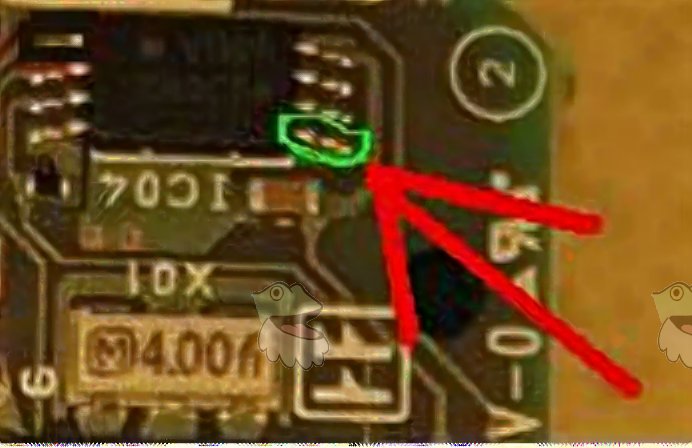
3. Remove the leg(leg is in a green circle in picture) of the chip above to the word IC


That should be it for making the battery.
If your PSP is bricked, when you insert the battery the green power light should stay on with no screen. If this happens to your PSP you have done everything right so far. The next step is to make the magic memory stick.

Magic Memory Stick

1. Download PSP Grader v008 from this link
http://pspslimhacks.com/psp-grader-v008/

2. Open PSP Grader v008

3. On PSP Grader v008 press the download button.

4. Once it has finished downloading insert your Memory card to your PC and select the psp/memory stick drive on PSP grader

5. Select format Memory Stick

6. Select Create Pandora Stick and it should make it.

Unbricking

Once it has successfully made the memory stick do this.
Take out the battery and insert the Memory Stick and then insert the Pandora Battery WHILE HOLDING THE L TRIGGER.

Keep holding the L trigger and the psp lights should start blinking like crazy and then a menu should come up.
Select Install 5.00m33.
Once you have done that and it has finished successfully, turn off your psp. Insert your normal battery wihtout the magic memory stick and see if it turns on.
If it has, Congratulations! You have successfully unbricked your psp.

Disclaimer: sa 7 ka tries nako ani, once ra ko na palpak.. which is shameful actually.. But we all do make mistakes...